A Calm First Evening with a New Note-Taking App
A calm first evening with a new note-taking app helps you capture one useful note, find it again and leave imports and reorganisation for later.
A calm first evening with a new note-taking app begins with one real note, not a mass import. On an iPhone or iPad, the useful first test is whether you can capture something you need and find it again without creating a filing system before you know how the app works.
Treat the session as a small orientation, not a migration project. A note-taking app may offer folders, tags, templates, scanning, handwriting, links and sync settings, but you do not need to settle all of those choices tonight. First learn the path from an idea to a saved note and back.
What should I try first?
Choose a small, current detail that would be useful to keep: a book recommendation, a question for an appointment, or the name of a place you want to look up. It should be real enough to matter, but not so sensitive or complicated that you hesitate over where it belongs.
Open the app and create a plain text note using its usual new-note control. Give it a specific title, such as “Questions for the dentist” or “Soup idea from Maya”, rather than “Notes” or “Later”. Add only the details you would want to recognise when you see the note again.
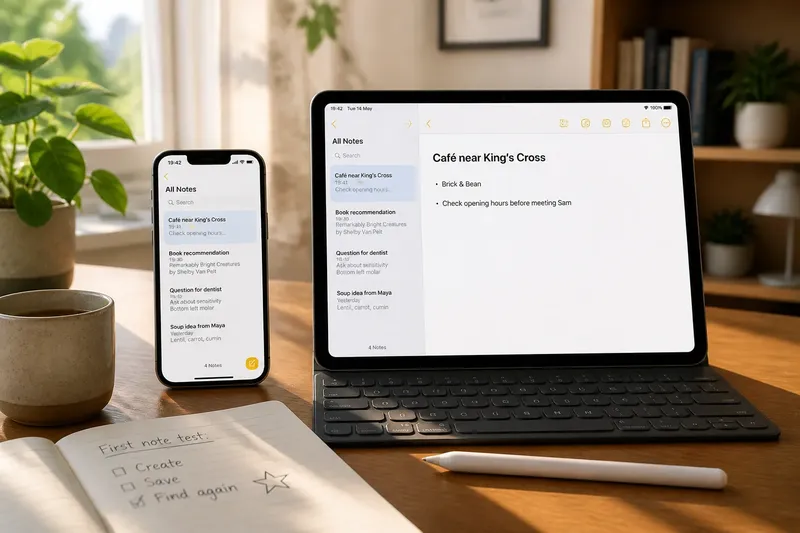
For instance, say you have just heard about a café near a train station and want to remember it. You could create “Café near King’s Cross”, add the name if you know it, and write “Check opening hours before meeting Sam”. The expected observable result is a saved note whose subject and next action are clear when it appears in the note list.
Do not spend the first session decorating the note. If the app offers colours, heading styles, checkboxes and attachments, leave them alone unless one solves an immediate problem. A notebook is like a coat pocket: it helps to know what you put inside before adding dividers.
How much should I set up?
Set up only what the app requires to save and reopen the note. If it asks you to choose a notebook, the default location is usually enough for an initial trial. If it asks for permissions, consider what feature needs access and whether you plan to use that feature now.
Some apps let you create a note without an account; others ask you to sign in or enable sync. Sync means keeping notes available across devices through an account or service. It can be useful if you expect to switch between an iPhone and iPad, but it is separate from learning whether the writing and retrieval experience suits you.
Read the app’s own description of storage and privacy before putting confidential material into it. For an ordinary first note, choose a low-stakes subject and avoid including passwords, financial details or private information about someone else. If you are unsure where data is stored or who can access it, leave sensitive notes out until you have checked the relevant settings and terms.
On an iPad, you may prefer the on-screen keyboard, a hardware keyboard or an Apple Pencil, depending on the app and the note. Do not make the first session a comparison of every input method. Use whichever is already comfortable, then notice whether the app makes capture feel straightforward.
Can I find the note again?
Yes: close the note or return to the app’s main list, then try to locate it using the title or a word from its contents. This checks a different part of the experience from writing. A note that is easy to create but hard to retrieve may need a clearer title, a search test or a simpler place in the app.
Start with the visible note list. If the note is not immediately obvious, use the app’s search field and enter a distinctive word that you included. Notice whether search covers titles, note text, scanned documents and handwriting; apps differ, and the search results often explain what the app can retrieve.
Then check what happens when you leave and return to the app. The note should still be present in its list, and opening it should show the content you entered. If you are comparing devices, you can later check whether it appears on the other device after the app’s sync has had time to run; there is no need to make that a condition of tonight’s first session.
If search does not find the note, check for a simple cause before changing settings: perhaps the word was misspelt, the note was not saved, or the search is limited to a selected folder. This is a useful discovery, not a reason to import everything or build a more elaborate system. Record what you learned, then decide whether the app’s retrieval tools fit the way you expect to look for notes.
What should wait until later?
Most organisation decisions can wait until you have more than one or two notes. A folder structure designed in advance tends to reflect imagined future needs. A small collection gives you better clues about the kinds of subjects you actually capture and the labels that would help you find them.
Leave these tasks for another session unless one is needed to save your first note:
- Bulk imports: Wait before moving notes from Apple Notes, a text file or another service. First confirm that the new app can store and retrieve a note in the form you want.
- Folder design: Start with the default location, then create folders only when a real group of notes is difficult to browse.
- Tags and links: These can connect related notes, but their value is easier to judge after you have recurring subjects to connect.
- Templates: Skip elaborate formats until you know what information you repeatedly record. A simple note can reveal whether a template would save effort.
- Automation and integrations: Shortcuts, sharing actions and connections to other apps add options, but they can distract from learning the app’s basic capture and search.
- Appearance changes: Themes and layout preferences are personal choices. Leave them until you know whether the default view makes your notes readable.
Before an import, check the source app’s export options and the destination app’s supported formats. An import can change formatting, attachments or links, so keep the original notes available until you have inspected any transferred material. The right process depends on the apps’ instructions and the data involved.
How do I judge the app?
Judge the first session by a few practical observations rather than by the number of features on the screen. Could you create a note without hunting through menus? Did the title make it recognisable? Could you return to it through the list or search? Did the app make clear where the note was saved?
Also notice any friction that would recur in your ordinary use. Perhaps a new note opens in a format you do not want, the list hides useful titles, or search requires extra taps. Write down one specific question to answer later instead of attempting to fix every preference during the first sitting.
One evening is not enough to judge every part of a note-taking app. You may still need to learn how it handles offline access, attachments, export or sync. The first session can tell you whether its basic path feels understandable and what to investigate next; it need not produce a final verdict.
What should I check before leaving?
Take a brief pause before you close the app. Confirm that the note is visible, that its title makes sense in the list, and that you know how to return to it. If a setting or permission remains unclear, make a note of the question rather than tapping through prompts just to clear them.
Then choose a sensible stopping point. You might leave the app with one note, no new folders and a question about whether search includes handwritten text. That is a useful result: you have learned the app’s basic route and kept your existing notes untouched.
If you want to continue another day, add a second note from a different part of your routine and see whether the same capture and retrieval pattern still works. This is a better basis for deciding on folders or tags than designing them around assumptions. A calm first evening with a new note-taking app is successful when you know how to save one useful thought, find it again and leave the larger decisions for a clearer moment.