Before the App Store: How Early iPhone Software Worked
Early iPhone software centred on built-in tools and Safari web apps. See how the App Store changed the way users found and kept additional software.
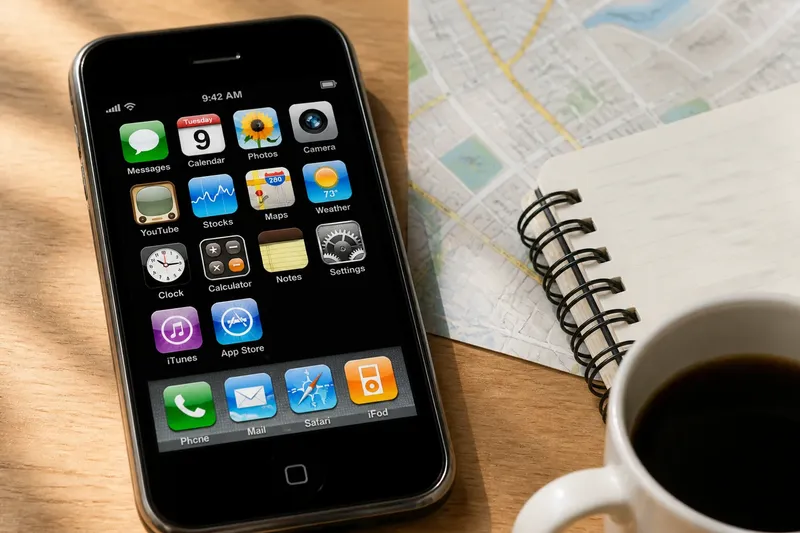
Early iPhone software centred on Apple’s built-in tools and web apps opened in Safari. Before third-party native apps arrived through the App Store, users could reach other services online, but could not install them as ordinary native apps.
The supplied software
The first iPhone came with a defined set of built-in functions, including calls, messages, a camera, maps, music and a calendar. Their Home screen icons made these tools the obvious starting points. Users did not choose them from a software catalogue; they came with the phone.
This arrangement made the device straightforward to understand. The icons signalled its main uses, and its touch interface provided a consistent way to open and move between them. But the supplied software also set the limits of what was easy to do. If a tool did not suit a particular need, users could not simply install a third-party native alternative.
That description applies to the iPhone’s initial software model, not to every stage of its early history. Apple later introduced the App Store, creating a route for users to install third-party native apps. The change was from a largely fixed set of built-in tools to a phone whose software users could extend.
Safari web apps
Before native downloads were available, web apps offered another way to use software. These were websites or services designed to work in a browser, sometimes with an interface adapted for a small screen. Users visited a web address in Safari rather than installing an app on the device.
A web app depended on the browser and on the service being available online. Its appearance and controls could differ from those of Apple’s built-in tools. To return to it, a user might revisit the address or save a browser shortcut; it did not appear as an installed native app in the same way.
This route allowed makers to offer services to iPhone users through a website, without distributing native software. It widened what people could access, but it did not provide the shared on-device catalogue that arrived with the App Store.
Finding software
Built-in software was discovered by looking at what the phone already offered. Web apps were found through addresses, links or searches. That changed the user’s question from “What can this phone do?” to “What can I reach through its browser?”
Imagine a user who wants local bus arrival information before third-party native apps are available. They visit the transport operator’s mobile-friendly website in Safari and save its address as a bookmark. The resulting routine is clear: they open Safari, select the bookmark and see the information the website provides. If the site is unavailable or awkward to use on the phone, the bookmark does not solve that problem.
A later native app for the same task would be found and installed through the App Store, then opened from its own icon. The difference is not simply the information on screen: it is the route to the service and how the user returns to it.
Native downloads
A native app is software installed on a device to run as an app, rather than a page used inside a browser. The App Store brought browsing, selection and installation together in a shared catalogue. A user could search or browse listings, choose an app, install it and open it from the Home screen.
For makers, the store provided a common route to users, rather than relying only on people finding a particular website. For users, a listing offered an initial description and an icon before the app was opened. The store made additional software easier to discover and obtain, though users still had to judge whether an app suited their needs.
The Home screen also began to reflect choices made after buying the phone. Apple’s built-in tools remained, but users could add apps from other makers. The device’s software was no longer only the set supplied at the outset.
Web and native roles
The arrival of native downloads did not make websites irrelevant. A website can be useful for occasional visits or for information that does not call for an installed app. A native app can be convenient when a user wants a dedicated icon and a service designed to run as an app. The better option depends on the task and the service, not merely on the label.
Nor did a store listing settle whether an app would be easy to use. Makers still chose their own layouts and controls. The App Store changed how people found and installed software; it did not remove the need to decide whether a particular app was suitable.
Early iPhone app questions?
Could users install native apps at launch?
At the iPhone’s initial launch, users relied on Apple’s built-in software and web apps accessed in Safari. Third-party native apps later became available through the App Store.
How did web apps differ from native apps?
A web app was accessed through a browser as a website, while a native app was installed on the device. That affected where users found the software and how they returned to it.
What changed with the App Store?
The App Store offered a shared place to browse for and obtain third-party native apps. It brought discovery and installation closer together than seeking out each service’s website separately.
The lasting distinction
The useful historical distinction is between software supplied with the phone, services reached through Safari and native apps selected from a store. Each gave users a different way to find and return to a tool.
Think of the change as moving from a few tools laid out on a desk to a shelf where you can choose more. The desk tools remain ready to hand, while the shelf lets you add items that suit other tasks. In the same way, the App Store made the iPhone’s software less fixed and more open to user choice.
When comparing an old web service with a native app, look beyond the features: notice where you find it, what you open first and whether it becomes an installed part of the device or remains a destination in Safari. That distinction captures how early iPhone software changed as Apple introduced the App Store.